Model - View
Quick summary
KooModel lets developers create views that display or edit data stored on an OpenERP server. By implementing QAbstractItemModel, it works with Qt model/view widgets such as QTreeView, QListView, QTableView and QColumnView, making it possible to switch between them with very little code.
Contents
Today I'm going to explain the KooModel class in Koo. This class allows developers to simply create new views that need to display or edit information stored in an OpenERP server. KooModel implements QAbstractItemModel and thus allows to easily use any view that uses Qt's model/view (Including QTreeView, QListView, QTableView and QColumnView). Where easy means changing one (or very few) lines of code to switch from one view to the other.
Frequently asked questions
What does the KooModel class allow developers to do?
It allows developers to create new views that display or edit information stored on an OpenERP server.
Which interface does KooModel implement?
KooModel implements QAbstractItemModel, which allows it to be used with views based on Qt’s model/view framework.
Which Qt views can be used with KooModel?
The article mentions QTreeView, QListView, QTableView and QColumnView as examples of views compatible with Qt’s model/view framework.
What does it mean that switching views is easy?
It means that moving from one view to another requires changing only one line of code, or very few lines, depending on the case.
Related articles
Developer
Koo performance improvements
Koo has gained performance through deferred loading of images, relational fields and view settings, along with fewer unnecessary server calls and faster navigation back to list views. On one very large product form, loading time fell from 10 seconds to 2, although the improvement depends on the data. The article invites the community to test the latest changes and report how they behave.
Tryton
Tryton, now even better equipped
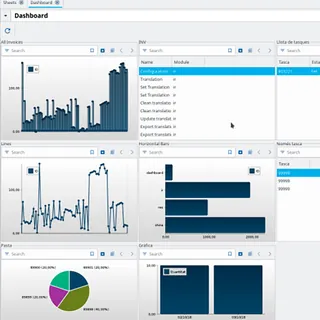
The 2019 Tryton Unconference introduced Shine, Papyrus and Printer, three tools developed to extend Tryton’s capabilities. Shine brings data work, calculations, charts and reports into the management environment, while Papyrus and Printer automate the inspection and capture of information from invoices and delivery notes.

Developer
Python and Tryton
Python has grown rapidly because it is simple, open source, compatible with other languages, and highly modular. Tryton has been built on Python since its creation in 2008, combining both technologies to provide a robust, adaptable ERP with strong technical capabilities.