Translations and user information in Jasper Reports
Quick summary
The `jasper_reports` module adds a virtual User relation so reports can access information about the person running them, even when the document is not related to a company. It also supports designing and previewing translations in iReport with `i18ngroovy`, the required libraries and the `tr()` functions.
Contents
We've recently improved a couple of things in the jasper_reports module for OpenERP which you'll find in bazaar.
User fiell
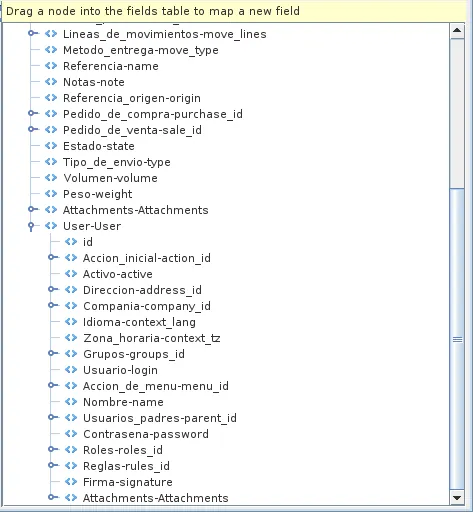
One of them is the addition of a virtual relation field called User. This new field gives the report designer access to all the information related to the user who is executing the report, which is specially interesting in those documents that don't have a direct or indirect relation with the company, such as sale/purchase orders or pickings.
i18n under iReport
Another improvement has been in the translations area. In order to ease report design, we've modified the Java code so it is possible to use our i18ngroovy language within iReport. Here are the steps you need to follow in order to configure iReport (libraries can be found in jasper_reports/java/lib):
Adding the gettext library
If you work under Linux go to menú option Tools -> Libraries, click on New Library... button. Set Library Name to "i18n" and add new JAR: "gettext-commons-0.9.6.jar"
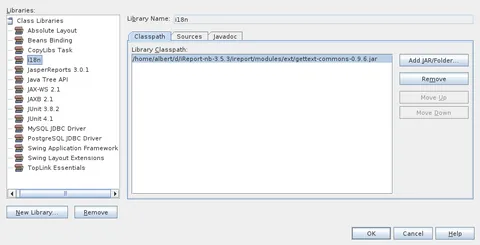
Adding the i18n library
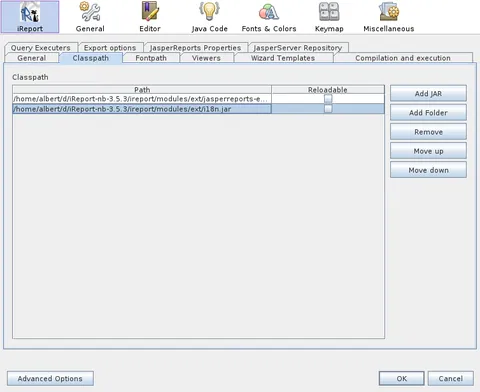
Go to menú option Tools -> Options -> Classpath. If you work under Linux add new JAR "i18n.jar". If you work under Windows you should also add the "gettext-commons-0.9.6.jar" file we added in the previous step under windows.
Adding the i18ngroovy property
Go to menú option Tools -> Options -> Jasper Properties and add a new property: called net.sf.jasperreports.compiler.i18ngroovy with value com.nantic.jasperreports.I18nGroovyCompiler
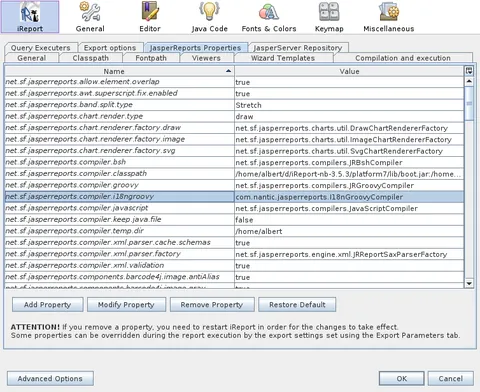
Note that windows users will be annoyed by the fact that this property is not remembered by the application when you restart it (at least with version 3.5.3) and thus has to be reset each time you open iReport. We hope iReport guys fix this issue in upcoming versions.
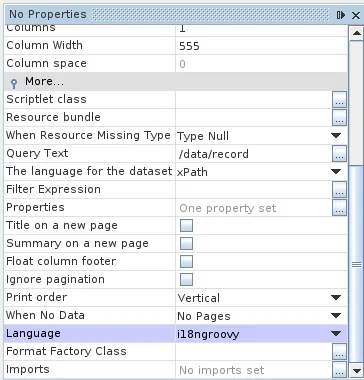
Setting report's Language
Once everything is configured you can use the new i18ngroovy language in your reports.
Usage
Now you can freely use the tr() set of functions to translate your reports and preview them within iReport. For example, in the following report we have the L variable defined as $F{Idioma-lang} != null && $F{Idioma-lang}.length() == 5 ? new Locale( $F{Idioma-lang}.substring(0,2), $F{Idioma-lang}.substring(3,5) ) : ( $F{Idioma-lang} != null && $F{Idioma-lang}.length() == 2 ? new Locale( $F{Idioma-lang}.substring(0,2) ) : $P{REPORT_LOCALE} ).
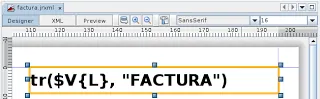

Note that reports that use Groovy instead of i18ngroovy will still work when run under OpenERP. This is only necessary for previewing reports that use NaN's translation system
Frequently asked questions
What is the virtual User field in reports used for?
It gives the designer access to information about the person running the report, including documents with no direct or indirect relation to the company, such as orders or pickings.
Which language can be used to preview translations in iReport?
The i18ngroovy language can be used; it was made available in iReport through changes to the module’s Java code.
Which libraries must be added to configure i18ngroovy?
Add gettext-commons-0.9.6.jar as the i18n library and add i18n.jar to the classpath; on Windows, the gettext JAR must also be added there.
Which iReport property enables the i18ngroovy compiler?
The property is net.sf.jasperreports.compiler.i18ngroovy, with com.nantic.jasperreports.I18nGroovyCompiler as its value.
Do reports using Groovy stop working in OpenERP?
No. Reports using Groovy instead of i18ngroovy continue to work when run in OpenERP; i18ngroovy is only needed to preview reports using NaN’s translation system.