Generating Jasper Reports from several models
When you need to create a new report using the jasper_reports module, you must use as base model the one in the screen where you want the button to be displayed.
For example, if you want a report that displays all product information, including its picture, in a brochure, the model will be product.product and the report button will be displayed on that model.
What if you want a button in a quotation to print the brochures of all products in the current quotation? Until now, there were three possibilities: create a new report with sale.order as its base model, create a wizard, or create a relate button that opens a new tab with all products in the quotation.
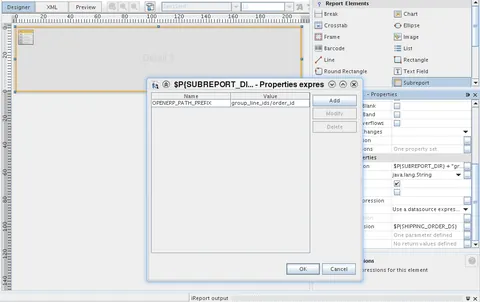
We implemented a new way to solve this problem using Jasper Reports. Create a new report with sale.order as its base model, insert a subreport embedding the brochure report, and add the OPENERP_PATH_PREFIX property to specify the path from the current model (sale.order) to the subreport model (product.product). In this example, the prefix path is order_line/product_id.
The following screenshot shows where to add the property using iReport: