Importing Excel files to OpenERP
Quick summary
Koo extends its import and export tools with support for the record ID, the database ID and the “Import compatible” flag. It also lets users import data from an Excel file by choosing a worksheet and asking the application to detect the fields automatically, as with CSV files.
Contents
Although Koo has supported import and export from the beginning (including the community-contributed improvement to export directly to OpenOffice.org under GNU/Linux), it lacked some features such as exporting and importing the ID and the database ID, as well as the ability to set the "Import compatible" flag. Last week we introduced these much-appreciated functionalities that are necessary to make standard import/export much more useful.
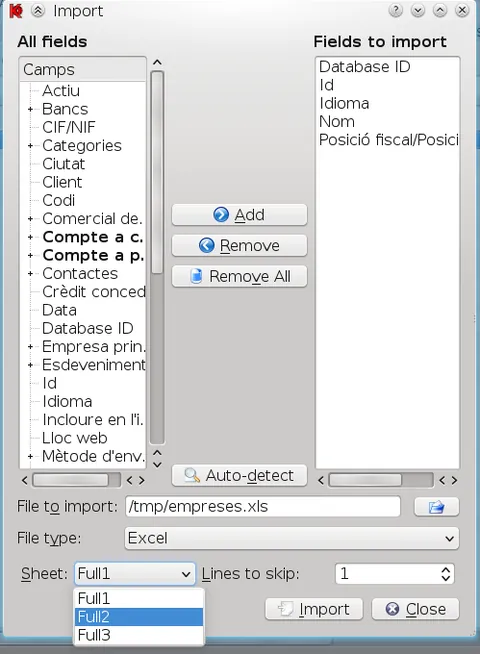
While we were at it, we added another feature that makes it easier for end users to import information. Now you can select any Excel (XLS) file and Koo allows you to select a sheet to import from the document. As with CSV files, you can ask Koo to automatically detect the fields to import.
Frequently asked questions
Which additional data can now be handled during import and export?
The record ID and the database ID can be exported and imported, and the “Import compatible” flag can also be set.
Can data be imported from an Excel file?
Yes. Koo lets users select an XLS Excel file and choose which worksheet to import.
Can Koo detect the file fields automatically?
Yes. As with CSV files, Koo can be asked to detect automatically which fields should be imported.
Which Excel format does the article describe?
The article describes importing XLS Excel files.