KooRunner: Koo’s full-text search integrated with the desktop
Quick summary
KooRunner connects Koo’s `full_text_search` module with KRunner, the KDE desktop tool for launching applications, searching for information and converting units. This brings ERP searches directly to the desktop used by KDE users.
Contents
Here is one of the two Christmas gifts for all OpenERP users who use the KDE desktop environment.
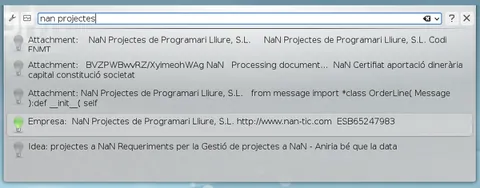
The image shows how we have brought the ERP to the users’ desktop, taking advantage of the possibilities of our full_text_search module and integrating them with KDE’s KRunner, the tool that users use to open applications, search for information, or perform unit conversions.
Frequently asked questions
Which Koo feature is integrated with KRunner?
KooRunner integrates Koo’s full-text search capabilities from the full_text_search module with KRunner.
What is KRunner in the KDE desktop?
KRunner is KDE’s tool for launching applications, searching for information and performing unit conversions.
What benefit does KooRunner offer KDE users?
It brings ERP search to the desktop and makes use of the same tool KDE users already use to search for information.
What other functions does KRunner provide according to the article?
Besides searching for information, KRunner can launch applications and perform unit conversions.