Papyrus, the tool that improves your document management
Quick summary
Papyrus automates the transfer of invoices from email to Tryton, making it easier to analyse documents, extract information and access attachments. It reduces the errors and time involved in traditional document workflows, while supporting invoices, delivery notes and orders with their related documentation.
Contents

As you know, it is currently essential to store and manage your company’s documents and invoices.
You are not alone. Every company faces the need to keep at least a certain amount of documentation.
And yes, it can be frustrating to spend so much time filing documents, only to be unable to find an invoice that has already been classified. Or to use unsuitable office tools. Has this happened to you while managing documents?
In fact, the filing procedure you probably follow is the following:
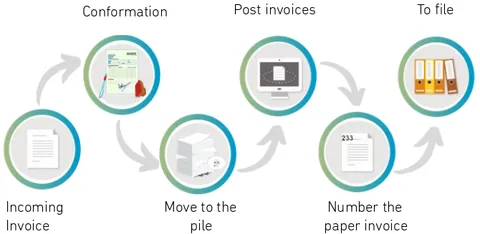
This workflow, presented as a diagram, shows the traditional process used by many companies. By following this process, we have identified several problems and errors that frequently occur.
The most common errors in the traditional workflow process are:
- Invoices are lost during classification and filing
- Errors are made on the invoice when transcribing it into digital format
- Physical filing is not organised
- Invoices are not returned to the archive after they have been used
- Time and documents are lost when invoices are exchanged internally for approval
In fact, many companies do not carry out the approval process because of the time it takes, which can lead to costs caused by errors in suppliers’ invoices.
Moreover, the process is generally slow and inefficient.
Would you like to save time on this type of task?
After all, we live in a world where almost nobody has time to spare, especially at work. It is therefore very important to have tools that help improve business management.
Below, we present a simpler workflow.
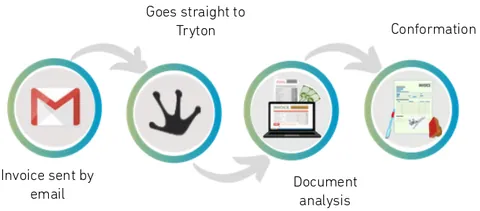
The invoice is transferred automatically from email to Tryton without any human intervention. From that moment on, the document can be analysed, information can be extracted and attachments can be viewed.
Papyrus allows you to:
- Process files more effectively and efficiently
- Facilitate the workflow
- Automatically attach the PDF document to the posted invoice
- Save time to devote to other areas of your company
- Find documents faster: everyone has access to them with a single click
- Turn this saved time into additional revenue for your company in the long term
- Facilitate the internal approval of invoices
Document management and storage are essential, and the traditional workflow involves several errors. Papyrus makes document management more efficient and effective. The Papyrus tool can be used for invoices, delivery notes and orders.
If you would like more information about Papyrus, please do not hesitate to contact us.
Frequently asked questions
What problems does the traditional document workflow cause?
It can lead to lost invoices, transcription errors, disorganised physical filing and wasted time when documents are exchanged internally for approval.
How do invoices reach Tryton with Papyrus?
The invoice is transferred automatically from email to Tryton without human intervention; the document can then be analysed, information extracted and attachments viewed.
Which documents can Papyrus manage?
The article states that Papyrus can be used for invoices, delivery notes and orders.
What is the benefit of automatically attaching the PDF to the invoice?
The posted invoice keeps its PDF attached, making the documentation easier to access and find later.
Related articles

ERP and Business
Archive delivery notes in seconds
Manual delivery-note filing can lead to lost documents, unnecessary copies and delays when an invoice needs checking. The article describes a Papyrus and QR-code workflow that scans a stack of documents and automatically classifies and attaches them to the corresponding delivery note in Tryton.
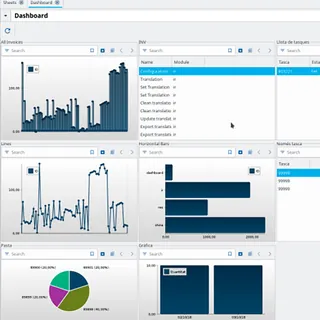
Tryton
Tryton, now even better equipped
The 2019 Tryton Unconference introduced Shine, Papyrus and Printer, three tools developed to extend Tryton’s capabilities. Shine brings data work, calculations, charts and reports into the management environment, while Papyrus and Printer automate the inspection and capture of information from invoices and delivery notes.
ERP and Business
Do you want more efficiency for less cost while improving business relationships?
EDI integration brings standardised electronic document exchange into the ERP, reducing manual administration, paper use and human error. More reliable accounting data and traceable exchanges also support financial planning and faster, safer B2B communication. Examples from Bon Preu Esclat and Nestlé show how these benefits apply to invoices, orders and inventory operations.