Building the Unexpected Office
Quick summary
Tryton’s office module brings notes and files together, making them easy to classify and find by name or content, while enabling collaborative editing inside the ERP. It also makes it possible to combine document knowledge with business data through the virtual assistant, with encrypted storage and the option of self-hosting.
Contents

Hello,
I hope you have had the chance to enjoy your holidays, if you were able to take one.
At NaN-tic, we have several updates, and today I want to tell you about a big one.
Building
Being able to build things is one of the most rewarding aspects of our work.
Building (software, in our case) means that every day is at least a little different from the one before. Even in large projects, you can think: we have taken one more step.
When you complete a stage, you have the satisfaction of having finished something made with your own hands, but also of knowing that what you have made is useful to others.
If you add to all this—as is the case for me—that you enjoy the act of building itself, then it is rewarding threefold: we enjoy doing, we constantly learn, and we help others.
What to build exactly comes directly from customers for some companies. For others, it comes from creating a product. We are fortunate to build some of the things customers ask for (we do a great deal of custom development), but we also devise and build solutions that solve problems customers do not always realise they have.
The office module that we are making available to our customers from version 8.0 onwards is one such case.
Although I do not know whether I would classify it as solving problems, or rather as opening up unexpected possibilities.
What does it let you do?
Quite a few things:
-
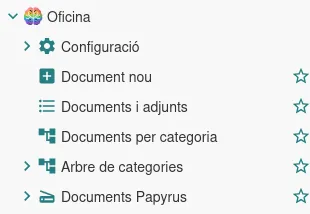
It lets you take note of anything and share it with other colleagues, replacing the previous Brainbow module with many improvements. These notes may or may not be attached to records in the system.
-
It lets you store files in the ERP without them necessarily being linked to records in the system.
-
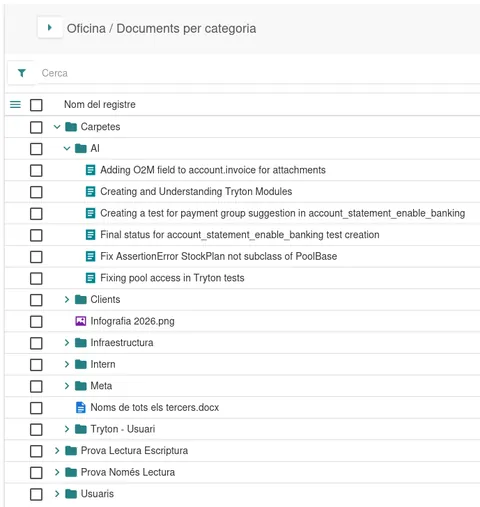
It lets you classify or tag these notes and all attached ERP documents using user-definable categories.
-
It lets you quickly search for any document stored in the system, by name but also by content. For example, by searching the text in a PowerPoint, the text in an image, or even its description. For example, if you save an image of a sunset, thanks to AI you can find it simply by searching for "sunset".
-
It lets you open and edit documents collaboratively (text documents, presentations, or spreadsheets) without leaving the application. We have integrated a 100% web-based editor similar to Google Docs or MS Office, compatible with Microsoft formats, where several users can edit a document in real time and it is automatically saved back to the ERP as changes are made. It is immediately searchable and available to users with access.
-
It lets you define corporate document templates and create documents directly from the ERP. Do you have a PowerPoint presentation template? A Word document with your company logo and typography? Anyone can easily create a corporate document.
-
It can detect viruses in every document users add, both when documents are saved and when they are downloaded. The virus database is updated once or twice a day!
-
It lets users share files directly from their computers. There are two options: a centralised shared folder in the case of a local network, or Google Drive- or OneDrive-style sharing, where files are stored on each user's computer and synchronised automatically. The system works on Linux, Windows, and Mac, and lets users transfer files from or to the relevant Tryton server in a matter of seconds. It also lets you share some documents as read-only with certain users.
-
It is also possible to convert files: for example, download a spreadsheet directly as a PDF, without needing to open the document editor.
All of this comes with the advantage that all information is stored encrypted on the Tryton server, replicated across several servers as soon as it arrives, and can be linked to a product record or customer record, for example. Moreover, if you prefer, it can be self-hosted: your information never has to leave your premises.
Unexpected possibilities
But what is truly interesting is making use of the integrated virtual assistant, because you can use the knowledge contained in these documents and combine it with the information stored in the ERP.
For example, does it seem impossible for your team to stop using that spreadsheet they consider sacred? Well, if you save it directly in Tryton, they can continue using it collaboratively, but you can ask our assistant: "Check whether the purchase status in the spreadsheet matches the information in the ERP; if any purchase does not yet exist, create it."
In fact, you can have AI perform this process automatically every time a user modifies the spreadsheet.
The list of possibilities is almost endless, especially with other improvements that I will tell you about over the coming weeks.
If you are interested in exploring the possibilities, just let me know.
Best regards!
Frequently asked questions
What kind of information can be stored with the office module?
It can store notes and files, either linked to ERP records or kept independently. They can also be classified using categories defined by the user.
How can stored documents be found?
They can be searched by name and by content. The search can include text from presentations, text in images, or an image description.
Can documents be edited collaboratively without leaving Tryton?
Yes. The module integrates a web editor compatible with Microsoft formats, allowing several users to edit text documents, presentations, or spreadsheets while changes are saved automatically in the ERP.
What security and deployment options does the article describe?
Information is stored encrypted on the Tryton server and replicated across several servers, while documents can be checked for viruses when saved and downloaded. The article also describes self-hosted deployment.
How can the virtual assistant use documents stored in the ERP?
It can cross-reference knowledge from documents with information in the ERP. The article gives the example of checking a purchasing spreadsheet and creating a purchase if it still exists in the spreadsheet but not in the ERP.
Related articles

Open Source and Trends
Why you shouldn't store all the emails you receive, it’s too expensive!
Obsolete marketing emails do not need to occupy server storage indefinitely, with the environmental costs that entails. Email Expiration Date proposes expiry dates for such messages while preserving recipients’ consent and control over deletion. In an interview, Jonathan Loriaux discusses technical safeguards, the need for providers to work together and ways to help the initiative move forward.

Newsletter
AI Applied to Data Analysis in Tryton
AI lets users describe the data they want to analyse in natural language and generate SQL queries for Tryton dashboards. The article shows why proposals must still be reviewed and refined, then tested in the ERP and turned into charts. The feature was presented in beta as a way to improve customer productivity and autonomy.

ERP and Business
ERP ROI: Calculating the benefits of implementing an ERP
ERP return on investment starts with measurable goals and a baseline collected before implementation. A meaningful assessment weighs savings against project costs and employees’ time, while recognising benefits that are harder to quantify. The ROI formula provides a financial measure, and ongoing KPI comparisons show whether the wider productivity and business objectives are being met.